
Finish The Word Script is a Lua-based Roblox script designed for players who want additional automation features while playing Finish The Word. Since the game focuses on vocabulary, spelling, and reaction speed, some players search for scripts that can help solve words faster, automate answers, and reduce manual input during gameplay.
Finish The Word is a popular Roblox word puzzle game where players must complete missing words before the timer expires. Each round challenges players to think quickly, identify letter patterns, and submit correct answers faster than their opponents. As difficulty increases, players need stronger vocabulary skills and quicker reactions to remain competitive.
The latest Finish The Word Script versions often include features such as Auto Answer, Fast Word Solver, Auto Play, Instant Response, Auto Type, Auto Suggest, Background Solver, Anti AFK, and various quality-of-life utilities.
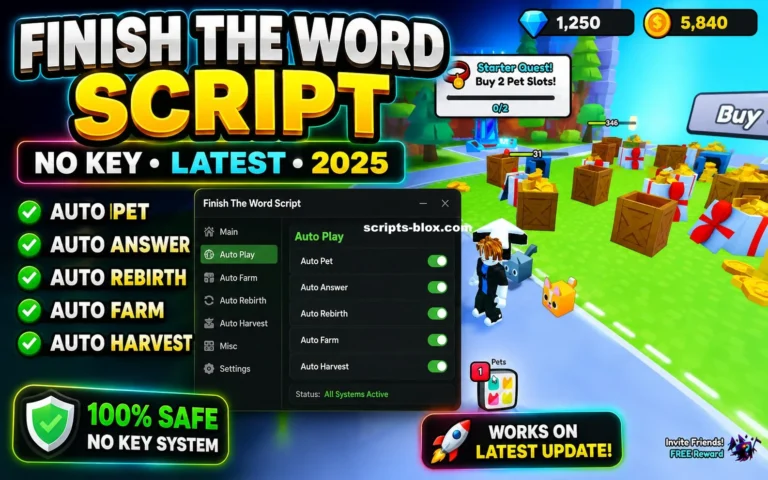
What Is Finish The Word Script?
Finish The Word Script is a custom Lua script created by third-party developers for the Roblox game Finish The Word. It runs through a Roblox executor and provides access to automation tools designed to assist with word-solving gameplay.
Depending on the version, the script may automatically detect words, suggest possible answers, type responses automatically, or perform other gameplay actions without requiring constant player interaction.
Many script versions include a graphical interface that allows users to manage features easily.
Latest Working Scripts
Word Helper + Auto Type (Best for Finishing Words Fast)
local player = game.Players.LocalPlayer
local gui = Instance.new("ScreenGui")
gui.Parent = player:WaitForChild("PlayerGui")
gui.Name = "FinishTheWordHelper"

local frame = Instance.new("Frame")
frame.Size = UDim2.new(0, 300, 0, 400)
frame.Position = UDim2.new(0.5, -150, 0.5, -200)
frame.BackgroundColor3 = Color3.fromRGB(30, 30, 30)
frame.Parent = gui

local title = Instance.new("TextLabel")
title.Size = UDim2.new(1, 0, 0, 50)
title.Text = "Finish The Word Helper [NEW PETS]"
title.TextColor3 = Color3.fromRGB(0, 255, 0)
title.BackgroundTransparency = 1
title.Parent = frame

local input = Instance.new("TextBox")
input.Size = UDim2.new(1, -20, 0, 40)
input.Position = UDim2.new(0, 10, 0, 60)
input.PlaceholderText = "Enter starting letter(s)"
input.Parent = frame

local suggestBtn = Instance.new("TextButton")
suggestBtn.Size = UDim2.new(1, -20, 0, 40)
suggestBtn.Position = UDim2.new(0, 10, 0, 110)
suggestBtn.Text = "Suggest Words"
suggestBtn.Parent = frame

local output = Instance.new("TextLabel")
output.Size = UDim2.new(1, -20, 0, 200)
output.Position = UDim2.new(0, 10, 0, 160)
output.Text = "Suggestions will appear here..."
output.TextWrapped = true
output.BackgroundTransparency = 0.5
output.Parent = frame

-- Simple dictionary (expandable, common long words for games)
local dictionary = {"apple", "banana", "catastrophe", "dinosaur", "elephant", "fantastic", "giraffe", "hippopotamus", "igloo", "jungle", "kangaroo", "llama", "magnificent", "narwhal", "octopus", "penguin", "quokka", "rhinoceros", "saxophone", "tiger", "umbrella", "victorious", "watermelon", "xylophone", "yacht", "zebra", "awesome", "brilliant", "creative", "dynamic", "excellent", "fantasy", "glorious", "harmony", "incredible", "journey", "knowledge", "legendary", "mysterious", "outstanding", "powerful", "quality", "remarkable", "spectacular", "tremendous", "unbelievable", "victory", "wonderful", "extraordinary", "phenomenal"}

local function suggestWords(startStr)
    local suggestions = {}
    for _, word in ipairs(dictionary) do
        if word:lower():sub(1, #startStr) == startStr:lower() then
            table.insert(suggestions, word)
        end
    end
    table.sort(suggestions, function(a, b) return #a > #b end) -- Longest first
    return suggestions
end

suggestBtn.MouseButton1Click:Connect(function()
    local start = input.Text
    if start == "" then return end
    local sugg = suggestWords(start)
    output.Text = "Top Suggestions:\n" .. table.concat(sugg, "\n")

    -- Auto type the longest one
    if #sugg > 0 then
        local word = sugg[1]
        wait(0.5)
        for i = 1, #word do
            game:GetService("VirtualInputManager"):SendTextInputEvent(word:sub(i,i))
            wait(math.random(0.05, 0.15)) -- Human-like typing
        end
        game:GetService("VirtualInputManager"):SendKeyEvent(true, Enum.KeyCode.Return, false, game)
        wait(0.1)
        game:GetService("VirtualInputManager"):SendKeyEvent(false, Enum.KeyCode.Return, false, game)
    end
end)

print("Finish The Word Helper loaded! Enter starting letter and suggest.")
Auto Farm + Pet Collector / Basic AFK Helper
local Players = game:GetService("Players")
local VirtualInput = game:GetService("VirtualInputManager")
local RunService = game:GetService("RunService")
local player = Players.LocalPlayer

print("Finish The Word Auto Farm + Pets loaded!")

-- Auto submit random/long words on prompt detection (adapt to game TextBox/Sound cues)
local autoFarm = true

RunService.Heartbeat:Connect(function()
    if not autoFarm then return end
    -- Example: Look for common word input areas (adjust paths if needed)
    local chatBar = player.PlayerGui:FindFirstChild("Chat") and player.PlayerGui.Chat:FindFirstChild("ChatBar")
    if chatBar then
        -- Simulate typing a safe long word
        local words = {"extraordinary", "phenomenal", "magnificent", "spectacular", "unbelievable"}
        local word = words[math.random(1, #words)]

        for i = 1, #word do
            VirtualInput:SendTextInputEvent(word:sub(i,i))
            task.wait(0.08)
        end
        VirtualInput:SendKeyEvent(true, Enum.KeyCode.Return, false, game)
        task.wait(0.1)
        VirtualInput:SendKeyEvent(false, Enum.KeyCode.Return, false, game)
        task.wait(math.random(8, 15)) -- Avoid spam detection
    end
end)

-- Simple Pet Equip Loop (simulate clicks on pet inventory if open)
task.spawn(function()
    while true do
        task.wait(30) -- Check every 30s for pets
        -- Example UI interaction (customize based on game hierarchy)
        local petFrame = player.PlayerGui:FindFirstChild("Pets") or player.PlayerGui:FindFirstChild("Inventory")
        if petFrame then
            print("Pet inventory detected! Equipping random pet...")
            -- Add specific button clicks here if you inspect game
        end
    end
end)

-- Toggle with chat command
player.Chatted:Connect(function(msg)
    if msg:lower() == "/toggle" then
        autoFarm = not autoFarm
        print("Auto Farm: " .. (autoFarm and "ON" or "OFF"))
    end
end)
Features Of Finish The Word Script
- Auto Answer
- Fast Word Solver
- Auto Play
- Instant Response
- Auto Type
- Auto Suggest
- Background Solver
- Anti AFK
- Auto Submit
- Auto Complete Words
- Fast Typing Assistance
- Auto Detection
- GUI Controls
- Easy Configuration
- Custom Settings
- Performance Optimization
- Auto Rejoin
- Word Pattern Detection
- Vocabulary Assistance
- Automated Gameplay Features
Why Players Search For Finish The Word Scripts
Finish The Word becomes increasingly challenging as players advance through rounds. Some players search for scripts because they want:
- Faster answers
- Easier progression
- Reduced manual typing
- Better reaction speed
- Automatic word solving
- Faster completion times
- Less repetitive gameplay
- Additional convenience features
- Learning opportunities related to Lua scripting
- Experimentation with Roblox automation
These reasons contribute to the popularity of scripting discussions within the game’s community.
Benefits Commonly Advertised
- Faster progression
- Reduced repetition
- Automatic answer submission
- Improved response speed
- Easier completion of difficult rounds
- Simplified gameplay
- Convenient automation tools
- Better efficiency
- Reduced manual input
- Learning opportunities for scripting enthusiasts
The effectiveness of these features depends on the specific script version and game updates.
How to Use Finish The Word Script
Running a script usually follows a simple process.
- Open Roblox.
- Join Finish The Word.
- Launch a compatible Roblox executor.
- Copy the script from the official website.
- Paste the script into the executor.
- Execute the script.
- Wait for the GUI menu to appear.
- Enable desired features such as Auto Answer or Fast Word Solver.
Some versions may include chat commands or background automation settings that can be configured after execution.
Supported Executors
Finish The Word Script is commonly advertised as compatible with:
- Delta Executor
- Hydrogen
- Fluxus
- Wave
- Xeno
- Arceus X
- KRNL
- Synapse X
Compatibility may vary depending on updates and platform support.
Why Finish The Word Is Popular
Finish The Word continues to attract players because it combines quick thinking, vocabulary skills, and competitive gameplay.
Players enjoy:
- Word puzzles
- Fast-paced gameplay
- Vocabulary challenges
- Competitive rounds
- Typing practice
- Pattern recognition
- Skill progression
- Educational value
- Quick matches
- Continuous improvement
The combination of learning and competition makes the game appealing to a wide audience.
Tips For Finish The Word Players
Even without scripts, players can improve naturally by following these strategies:
- Practice common English vocabulary.
- Increase typing speed.
- Learn common prefixes and suffixes.
- Study word patterns.
- Focus on reaction speed.
- Play regularly.
- Pay attention to frequently used words.
- Challenge yourself with longer words.
These methods can significantly improve performance over time.
Frequently Asked Questions (FAQs)
What is Finish The Word Script?
Finish The Word Script is a custom Lua script designed for the Roblox game Finish The Word. It is commonly advertised as providing automation tools and word-solving assistance features.
Is the script free?
Most public versions are available for free, although some private script hubs may offer premium versions with additional features.
What does Auto Answer do?
Auto Answer is commonly advertised as automatically detecting and submitting word answers during gameplay.
What is Fast Word Solver?
Fast Word Solver is a feature that attempts to identify missing letters and complete words more quickly than manual guessing.
Does the script work on mobile?
Some versions support Android and iOS executors, although compatibility depends on the device and executor being used.
Can multiple features run at the same time?
Yes. Most versions allow players to use Auto Answer, Auto Type, Auto Play, and Anti AFK simultaneously.
Is using scripts safe?
Players should understand that using third-party scripts may involve security risks, compatibility issues, and potential account-related consequences.
Does the script receive updates?
Many active developers release updates regularly to maintain compatibility with Roblox updates and newly added content.
Why do players use Finish The Word scripts?
Players often search for scripts to automate difficult tasks, reduce repetition, improve efficiency, or experiment with Roblox scripting systems.
Conclusion
Finish The Word Script is a Lua-based Roblox automation script commonly associated with features such as Auto Answer, Fast Word Solver, Auto Play, Instant Response, Auto Type, Auto Suggest, Background Solver, and Anti AFK. These tools are often advertised as ways to simplify gameplay and improve efficiency during word-solving challenges.
Whether you’re interested in vocabulary practice, typing improvement, competitive gameplay, or simply learning more about Roblox scripting communities, Finish The Word remains one of Roblox’s most engaging word puzzle experiences, offering players a fun combination of learning, speed, and competition.