
Broken Bones IV Script is a Lua-based Roblox script designed for players who want to automate farming, collect rewards faster, and progress more efficiently in the popular Roblox game Broken Bones IV. The game focuses on launching your character down mountains, breaking bones, earning cash, unlocking upgrades, and discovering new ways to achieve higher scores.
As players continue unlocking better maps, upgrades, and equipment, many search for automation tools that help reduce grinding and improve efficiency.
The latest Broken Bones IV Script versions often include features such as Auto Farm, Auto Launch, Auto Collect Rewards, Teleport, Auto Rejoin, Anti AFK, Easy GUI, Auto Earn Money, Auto Upgrade, Ragdoll Control, and many more useful functions.
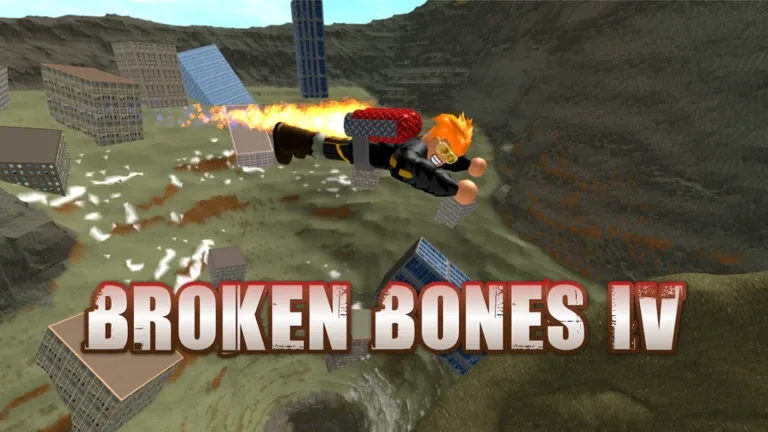
What Is Broken Bones IV Script?
Broken Bones IV Script is a custom Lua script developed by third-party creators for the Roblox game Broken Bones IV. It runs through a Roblox executor and provides automation features that help players earn rewards, collect money, complete activities, and progress more efficiently.
Instead of manually repeating launches and farming cash for upgrades, the script automates various gameplay functions while providing additional utility features.
Most versions include a user-friendly graphical interface that allows players to customize and manage different functions easily.
Download & Copy All Broken Bones IV Script 2026
1. Broken Bones IV Script No Key
local player = game:GetService("Players").LocalPlayer
local Respawn
pcall(function() Respawn = getsenv(game:GetService("ReplicatedFirst"):FindFirstChildOfClass("LocalScript")).Respawn end)
_G.farm=true
while wait(0.5) do
if _G.farm then
local char = player.Character
local root = char.HumanoidRootPart
for j=1,3 do
char:SetPrimaryPartCFrame(CFrame.new(-400,700,-250))
wait(0.5)
for k=1,19 do
if root:FindFirstChild("BodyForce") then root.BodyForce:Destroy() end
root.Velocity = Vector3.new(0,-500,0)
wait(0.1)
end
end
for j=1,30 do
char:SetPrimaryPartCFrame(CFrame.new(0,26,-172))
root.Velocity = Vector3.new()
wait()
end
wait(4)
if Respawn then
player.PlayerGui.Gui.Summary:TweenPosition(UDim2.new(0.5, 0, 1.5, 0), "In", "Back", 0.75, true)
Respawn(workspace.CurrentCamera.CFrame, workspace.CurrentCamera.Focus)
player.PlayerGui.Gui.Summary.Visible=false
else
repeat wait(0.1) until not player.PlayerGui.Gui.Summary.Visible
end
end
end
Features Of Broken Bones IV Script
- Auto Farm
- Auto Launch
- Auto Collect Rewards
- Teleport
- Auto Rejoin
- Anti AFK
- Easy GUI
- Auto Earn Money
- Auto Upgrade
- Ragdoll Control
- Fast Farming
- Auto Progression
- Auto Claim Rewards
- Walk Speed
- Jump Power
- Auto Complete Tasks
- Performance Optimization
- Custom Settings
- Quick Navigation
- Auto Recover
Why Players Search For Broken Bones IV Scripts
Broken Bones IV focuses heavily on launching characters, earning money, unlocking upgrades, and improving performance. Many players search for scripts because they want:
- Faster progression
- Easier farming
- Reduced grinding
- Faster money collection
- Better reward collection
- Improved efficiency
- Automatic gameplay functions
- Easier upgrades
- More convenience features
- Simplified gameplay
These reasons contribute to the popularity of scripting discussions within Roblox communities.
Benefits Commonly Advertised
- Faster progression
- Easier farming
- Reduced repetitive gameplay
- Better reward collection
- Faster money generation
- Improved efficiency
- Convenient automation tools
- Enhanced gameplay experience
- Easier upgrade progression
- Long-term progression support
The effectiveness of these features depends on the script version and game updates.
How to Use Broken Bones IV Script
Running a script usually follows a simple process.
- Open Roblox.
- Join the Broken Bones IV game.
- Launch a Roblox executor tool.
- Copy the script from the official website.
- Paste the Broken Bones IV Script into the executor.
- Click on the Execute button.
- Wait for the GUI menu to appear.
- Enable the features you want to use.
Most versions provide a dashboard where players can customize settings and activate different functions.
Supported Executors
Android
- Delta
- Hydrogen
- Fluxus
- Arceus X
- Codex
iOS
- Delta iOS
- Arceus iOS
- Codex iOS
PC
- Xeno
- Wave
- Velocity
- Krnl
Compatibility may vary depending on updates and platform support.
Why Broken Bones IV Is Popular
Broken Bones IV has become popular because it combines physics-based gameplay, progression systems, upgrades, and rewarding mechanics into an entertaining Roblox experience.
Players enjoy:
- Launching characters
- Breaking bones
- Earning money
- Unlocking upgrades
- Exploring maps
- Collecting rewards
- Improving scores
- Upgrading equipment
- Completing challenges
- Long-term advancement
The combination of physics mechanics and progression keeps players engaged and motivated to unlock better upgrades.
Frequently Asked Questions (FAQs)
What is Broken Bones IV Script?
Broken Bones IV Script is a custom Lua script designed for the Roblox game Broken Bones IV. It helps automate gameplay activities such as farming money, collecting rewards, launching characters, and improving progression through various utility features.
Is Broken Bones IV Script free?
Many public versions are available for free, although some private script hubs may offer premium versions with additional features and exclusive functions.
Can I get banned for using it?
Using third-party scripts may violate Roblox rules or individual game policies. Players should understand the potential risks before using any external tools and make informed decisions regarding account safety.
Does it work on mobile?
Some versions support Android and iOS devices through compatible executors. Mobile compatibility depends on the executor being used and whether the script supports the latest version of the game.
Will it work after updates?
Game updates can occasionally break script compatibility. When this happens, developers usually release updated versions to restore functionality and support the latest game content.
Do I need a paid executor to run it?
Most scripts work with supported executors and do not specifically require paid access. However, some advanced scripts may perform better with executors that offer additional compatibility features.
Why is the script not working?
The script may stop working because of a recent game update, an unsupported executor, installation mistakes, or compatibility issues. Using the latest script version and a supported executor usually resolves most common problems.
Conclusion
Broken Bones IV Script is a Lua-based Roblox automation tool commonly associated with features such as Auto Farm, Auto Launch, Auto Collect Rewards, Teleport, Auto Rejoin, Anti AFK, Auto Earn Money, Auto Upgrade, and Ragdoll Control. These features are designed to automate repetitive gameplay activities and help players progress more efficiently.
Whether you’re trying to earn money faster, unlock upgrades more quickly, collect rewards efficiently, or enhance your overall gameplay experience, Broken Bones IV remains an entertaining Roblox game that combines physics-based gameplay, progression systems, upgrades, rewards, and long-term advancement.